
FUTURE LAB未莱Explore the course
Illustrative learning scene: a student exploring a laptop prototype and paper sketchesIllustrative learning scene

GRADES 9–11 · 8-WEEK PROJECT PROGRAM

In eight weeks,build an AI-assistedproject you can explain.

For students in grades 9–11: turn one idea into a working app or project prototype. Leave with the demo, a record of the process, and a clear explanation of your own contribution.

Grades 9–11Designed for high school students
8 weeksOne project, developed over time
A working demoAn AI-assisted app or usable prototype
A contribution recordExplain what you did and why

FROM PROMPTS TO PROJECTS

Knowing how to prompt AI is not the same as finishing a project.

Your child may already generate text, images, or code. The next skill is bringing those abilities together to solve a small, specific problem.

We want students to become more independent in moving an idea forward: framing a focused problem, judging AI-generated material, testing what they make, and explaining their choices. One project is a starting point for practising that method.

01

Many ideas, no clear starting point

Turn a big idea into a focused question that can be tested in eight weeks.

02

Generated content, uncertain quality

Check sources, test functions, and explain what was accepted or rejected.

03

A first version, then no progress

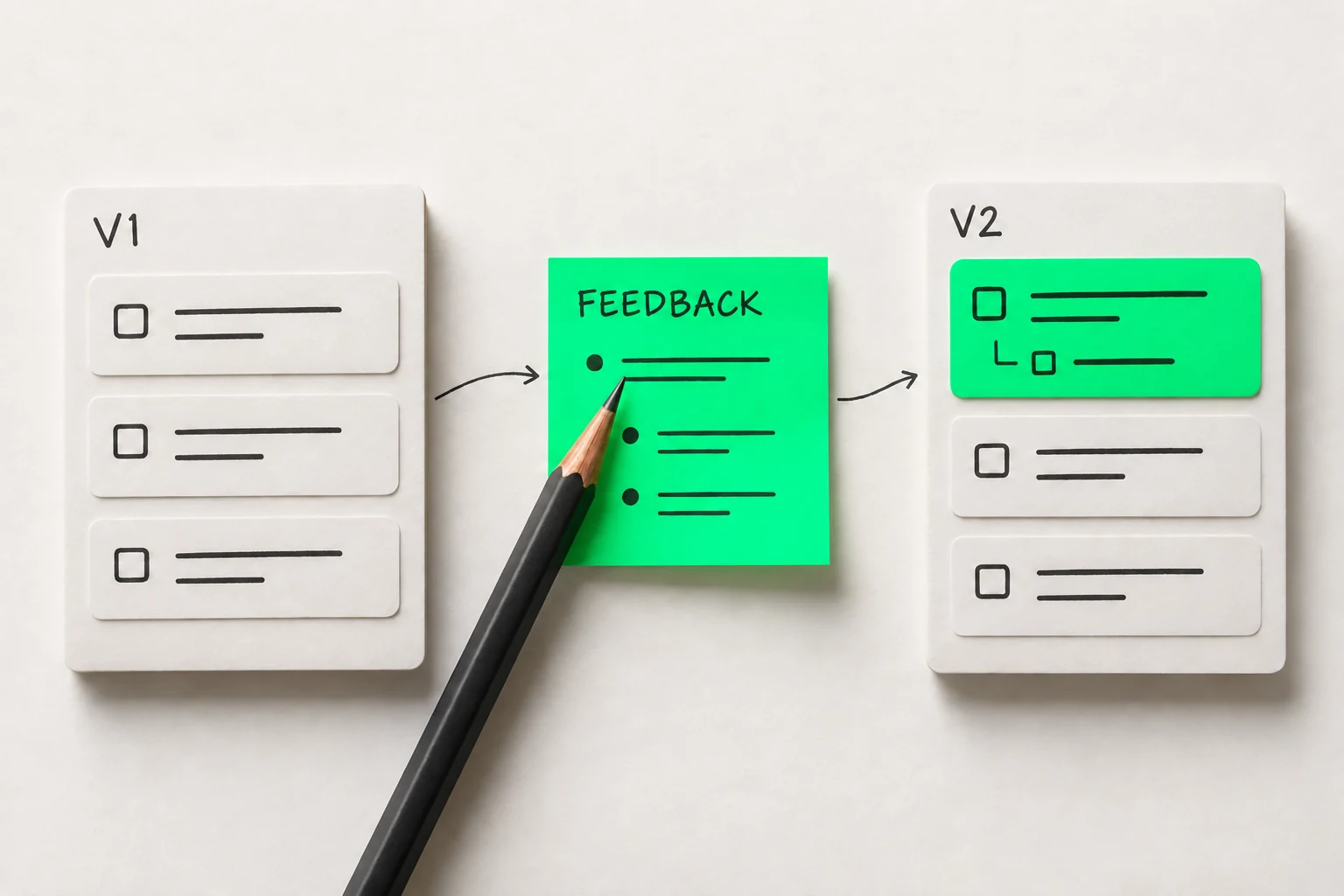
Let someone try it, record where they struggle, and use feedback to improve V2.

01 / WHAT COMES HOME

Bring home the project and the thinking behind it.

03

A record of the student’s own contribution

View contributions

What the student decided, where AI helped, and why a particular approach was chosen.

COURSE SAMPLE
STUDENT DECIDESSolve “where to start” first; leave reminders for a later version.
AI ASSISTSSuggest interface and implementation options.
STUDENT CHECKSTry each task, check state changes, and explain the order.
04

A complete project explanation

View the talk outline

Explain the problem, features, revisions, and limitations, and answer why each choice was made.

COURSE SAMPLE
90s

Problem. Choice. Evidence. Next step.

  1. 0–20s: Who is it for, and what problem matters?
  2. 20–45s: Demonstrate the core flow.
  3. 45–70s: Explain the change and your contribution.
  4. 70–90s: Name a limitation and the next test.

The goal is a demonstrable, explainable project milestone. Commercial launch, paying users, and college admission are not guaranteed.

02 / ONE CONCRETE EXAMPLE

Meet Study Start.

COURSE PROJECT EXAMPLE

Three tasks. No clear starting point. Try the first draft, then see how one piece of feedback changes the next action.

Try it. Then compare the change.

Interactive course example · Runs locally on this page

STUDY STARTV1

Preset tasks for this demonstration

0 / 3 tasks complete

Changes stay on this page and reset when you refresh.

2 / 4
02 / Build V1

Make one small function work first.

The first version lists tasks and lets users mark them complete. Try a task: the function works, but the order is unclear.

Who makes each decision?
Student decides
Choose the smallest useful function
AI assists
Help implement interface and state logic
Mentor asks
Can someone try the work?

V1: a flat list → V2: priority + a starting action

This illustrates iteration. It is not evidence of learning outcomes or a deployed product.

Read the problem, choices and learning goals

This example addresses an everyday problem: the tasks are written down, but a student still does not know where to start. A simple list becomes a small tool with a clear priority and a manageable starting action.

Problem
Help a user choose a task they can start now.
V1 features
Show three tasks and let users mark them complete.
What testing reveals
The Done button works, but users still have to decide the order themselves.
V2 improvement
Highlight a near-term task and break its first step into a smaller action.
What the student must do
Choose the problem, decide which features matter, select feedback to act on, and explain the changes.
Explore the process in 20 seconds
COURSE PROJECT EXAMPLESTUDY START
05 / THE OUTCOME

A change you can explain.

V1

A list of tasks

V2

A clear first step

Start here →
↳ Problem brief↳ Test notes↳ Contribution record
Build it. Explain it.20 / 20s
Try the full project yourself ↗

03 / MORE WAYS TO BEGIN

Start with your interests and everyday problems.

The same learning method can lead to different projects. Open an example, compare versions, and try the core interaction.

CAMPUS / FIND

V2 · Filter, check the time, see the source

01

Design club

Thu · 16:00–17:00

Time conflict with sample schedule
02

Photo walk

Thu · 16:30–17:30

Time conflict with sample schedule
03

Reading circle

Fri · 16:00–17:00

No conflict in sample schedule

Prepared examples only. Controls run on this page, reset on refresh, and make no bookings or public posts.

COURSE PROJECT EXAMPLE

Find something that fits your week.

Activity information is scattered. A useful tool helps someone choose, while keeping the source and schedule visible.

SAMPLE FEEDBACK

“I see lots of activities, but which fit my interests and time?”

See the learning decisions
Student decides
Choose categories and ranking, and check which sources deserve to be shown.
AI assists
Organize approved sample information and suggest filter logic.
Guidance asks
How does someone know this information is still current?

04 / EIGHT WEEKS, EIGHT CHECKPOINTS

A clear task and a reviewable output every week.

This is the eight-week curriculum design. Each week moves the project forward with work that can be reviewed.

  1. W01

    Choose the problem

    Pick a person and situation from an interest or everyday frustration. Explain what needs to change.

    This week’s output: Question card: user, situation, goal
  2. W02

    Check the need

    Organize sources and observations, separate facts from assumptions, and narrow the scope.

    This week’s output: Source list and minimum feature listView the problem brief
  3. W03

    Map the experience

    Show where a user begins and how they complete the core task.

    This week’s output: User flow and low-fidelity prototype
  4. W04

    Build V1

    Use suitable AI, no-code, or coding tools to make the core flow work.

    This week’s output: An operable first versionTry V1
  5. W05

    Let someone try it

    Set a simple test task, observe difficulties, and record more than whether someone likes it.

    This week’s output: Test notes and an issue list
  6. W06

    Improve V2

    Choose the most important issue to fix and compare the two versions.

    This week’s output: V2 and reasons for each change
  7. W07

    Document contributions

    Identify sources and AI assistance. Prepare the demo and personal contribution record.

    This week’s output: Process portfolio and presentation outline
  8. W08

    Present and reflect

    Demonstrate the work, explain decisions, and identify unresolved questions.

    This week’s output: Final demo and next-step planView contributions

05 / HOW LEARNING HAPPENS

A useful question can make the next version better.

Set the scope, review a working version, and explain the choices. Every change needs a reason and a way to check it.

01

Set the scope

Turn a broad idea into a core flow that can be completed.

02

Review the version

Show something usable and identify where the experience breaks down.

03

Explain the choice

Use tests and observations to support the change.

Follow one question through to a better version

GUIDANCE EXAMPLE · STUDY START

  1. 01

    Student proposes

    Show all tasks in a flat list.

  2. 02

    Guidance asks

    Can a first-time visitor tell what to do first?

  3. 03

    Student decides

    Highlight the due-soon task and add one small first step.

  4. 04

    AI assists

    Suggest the layout and implement the selected interaction.

  5. 05

    Check the revision

    Ask someone to find the first task without coaching.

Illustrative learning scene: people discussing a paper prototype
Illustrative learning scene

FOR PARENTS

You do not need to code to see the progress.

Follow the goal, the current version, the feedback and the next decision. These records give a family something concrete to discuss.

The records below illustrate the curriculum. Actual feedback frequency and communication arrangements are confirmed before enrollment.

Open a sample progress card
SAMPLE PROGRESS CARDW06
Current goal
Make the next action easier to see.
Current version
V2: a priority task with a small starting action.
What needs work
The full task still feels too large.
Student decisions
Highlight the due-soon task and break down its first step.
Next step
Check whether someone can identify that step without help.

AFTER EIGHT WEEKS

Take the method into your next project.

After one project, you can test an unresolved assumption, apply the same method to a new problem, or learn a skill the project now needs. Each next step begins with a small goal you can check.

SUGGESTED NEXT LEARNING STEPS

Keep improving

Choose one unresolved issue in the current project and plan the next test.

Try another problem

Reuse the problem brief, version record and reflection method in a different situation.

Go deeper where it matters

Choose the skill your project needs next: interface design, code, source checking or explanation.

06 / FIT & COMMITMENT

For students willing to build—and revise.

  • In grades 9–11, with an interest in apps, design, content, or a real-world problem
  • Able to start without coding experience, while willing to read, experiment, and explain their ideas
  • Able to make time for building and testing outside class alongside schoolwork

It may not be a fit if the goal is an instant finished product, having AI or a mentor do the work, or a course with no independent effort.

No idea yet? Open Project Spark
Local rule-based demo

These 36 combinations only illustrate the course logic. Selections are not sent to external AI models or saved on this page.

What sparks your interest?
What are your practical constraints?
What do you want to create?

PATH PREVIEW / Games · 8 weeks · Build a working demo

A choice that meaningfully changes a player's experience: make a project other people can try for themselves.

Milestone outcomeA playable core experience

Create a working demo within eight weeks

  1. 01Define the experience
  2. 02Build the core
  3. 03Invite people to try it
  4. 04Present it publicly
Show how AI and mentors share the work

AIIdentify the minimum features and suggest three prototype approaches to compare

MentorReview scope, evidence, and milestone work every two weeks

07 / CHOOSE YOUR FORMAT

Choose the format that fits your week.

Both planned formats follow the same eight-week project path. Choose a format and submit a parent enrollment-interest application before making an enrollment decision.

The planned learning package

  • Eight-week project milestones and assignments
  • Prototype-building and revision checkpoints
  • A project demo, process portfolio, and contribution record
  • A final presentation and next-step reflection

Class dates, location, mentor details, final fees, tool costs, and cancellation terms must be confirmed before enrollment. Applications are reviewed first. This website does not process payments; after confirmation, payment is arranged offline or through an official link sent separately.

ENROLLMENT INTEREST

Register your interest.

Leave your own adult contact details. The site owner can review the application here. No message or payment link is sent automatically, and no response time is promised.

  1. 01Submit your application
  2. 02Confirm the course and fees
  3. 03Pay offline or by a separate official link

Selected format: In person

Do not enter a child’s name, date of birth, grades, health information or other private details. There is no free-text student profile.

How this request is stored and withdrawn

Your name (if supplied), email, format, preference, language, submission time, consent version, application progress and any staff-entered payment record are stored in this site’s Cloudflare D1 database. A hash of your site sign-in ID links requests to your account and supports abuse limits. Only you and the verified site owner can view your request.

Applications that do not lead to enrollment are retained long-term with no automatic expiration. They remain until you actively withdraw or delete them, or applicable requirements call for deletion. While signed in with the same account, you can withdraw the application and delete its contact details below. The operator’s legal entity has not yet been published.

This form sends no email or SMS and has no third-party analytics. It records only aggregate submission/withdrawal counts, not page visits, IP addresses, fingerprints or full query strings. Hosting infrastructure may maintain necessary security logs. Short-lived account-based rate-limit counters are cleaned on later submissions.

My applications

No saved requests for this account yet.

08 / BEFORE YOU DECIDE

A few more questions before you decide.

01Can a beginner without coding experience keep up?

The curriculum allows a no-code or low-code start, adding technical skills as the project requires. Fit also depends on the student's reading, willingness to try, and ability to keep working.

02How do you avoid AI doing the work for the student?

Review the process portfolio and contribution record, then ask the student to explain choices, test results, and version changes. A polished final product alone does not show what the student understands.

03Can the project support a college application?

A genuine project process can help a student explain their interests, judgment, and growth, subject to school and application rules. The program does not promise credit, admission, awards, or an admissions advantage.

04Can I enroll and pay now?

Final tuition, class dates, mentor arrangements, and cancellation terms are still being confirmed. You can submit an adult parent enrollment-interest application. The team first confirms the course, fees and arrangements. Payment is then arranged offline or through an official link sent separately. This website does not process payments, and submitting does not mean payment, a reserved seat or admission.

Check the fit. Then choose the format.

Understand the project goals, time commitment, and class arrangements before making an enrollment decision.

Explore the course

Contact Future Lab

WeChat enquiries

Scan to add us on WeChat

Personal WeChat contact QR code, account name 未莱学院Open full-size image to save (opens a new tab)